
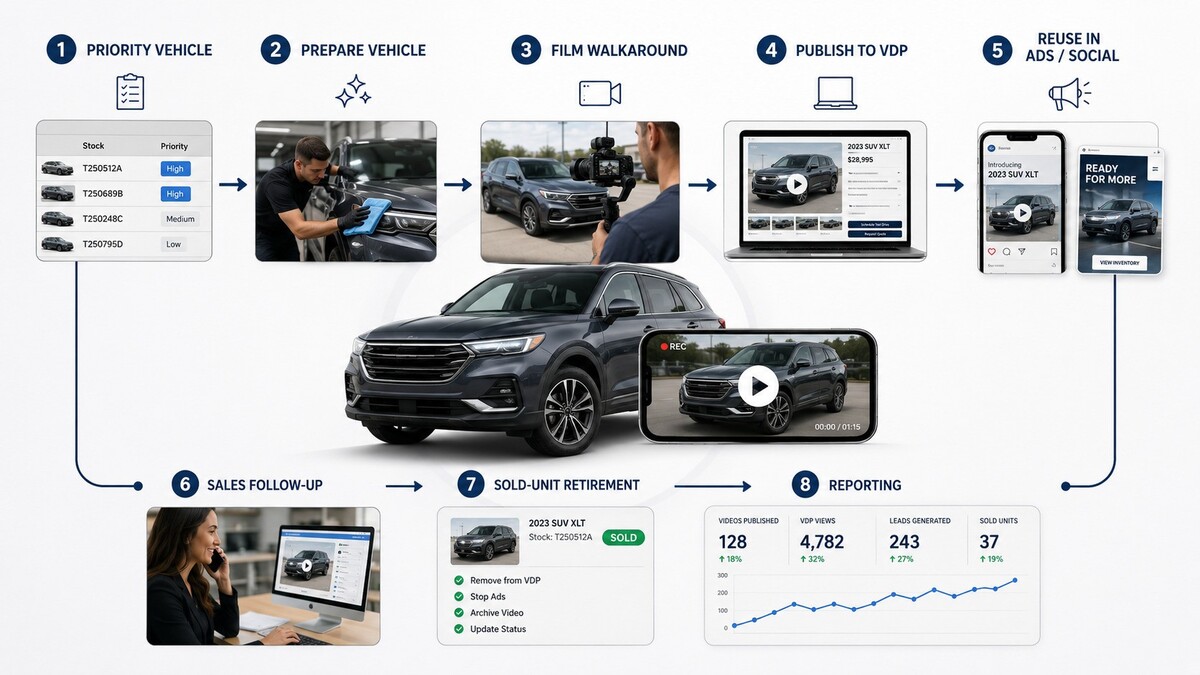
Dealership vehicle walkarounds are stock-specific videos that help a shopper understand a particular car, truck or SUV before the call, form fill or appointment. Their job is not cinematic branding. Their job is to reduce uncertainty, improve the inventory page and give the dealership a repeatable merchandising asset.
Quick answer: prioritize used vehicles, aged units, specialty models, premium trims, EVs, trucks and vehicles with condition or equipment questions. The right operating system combines a filming standard, honest coverage, correct VDP placement, a sold-unit process and reporting that connects video to shopper behavior.
What a Vehicle Walkaround Should Do
A useful walkaround answers the questions that a listing, photo set or OEM asset cannot answer well enough. It shows the actual unit early, explains the details that matter and creates a direct route to the relevant vehicle detail page, trade-in path or appointment action.
| Shopper uncertainty | Walkaround response | Commercial purpose |
|---|---|---|
| Is this the actual vehicle? | Show stock-specific exterior, interior and key identifiers early. | Improve confidence before a VDP conversion. |
| What makes this unit different? | Explain equipment, trim, condition, reconditioning or capability. | Support differentiation and reduce generic comparison shopping. |
| Will it fit my use case? | Demonstrate cargo, seating, towing, charging, technology or safety features. | Move qualified shoppers toward an appointment. |
| Can I trust the dealership? | Use a clear presenter, accurate statements and a straightforward next step. | Build local credibility without overproducing the asset. |
Which Vehicles Should Get Video First
Not every unit needs the same production effort. Prioritize coverage where the incremental merchandising value is highest.
| Priority tier | Vehicle types | Recommended approach |
|---|---|---|
| Highest | Used inventory, aged units, specialty vehicles, premium trims, EVs, trucks and high-consideration models | Stock-specific walkaround with condition, equipment and buyer-use explanation. |
| High | New models with trim complexity, scarce inventory or local demand opportunity | Reusable model explainer plus stock-level callouts where needed. |
| Selective | High-volume, low-differentiation new inventory | Template-led coverage tied to model page, offer or campaign. |
| Low | Units likely to sell immediately with limited merchandising need | Use photos and core listing detail unless a specific shopper question emerges. |
Walkaround Format and Filming Standard
A dealership does not need a different creative concept for every vehicle. It needs a repeatable format that staff, vendors and managers can execute without breaking the inventory workflow.
- Open on the actual unit. Identify the vehicle, trim and the buyer question it answers.
- Show the exterior with purpose. Cover condition, wheels, tires, truck bed, charging access or other details that affect evaluation.
- Explain the interior. Focus on seating, cargo, technology, driver assistance, third-row access or work capability.
- Address used-vehicle context honestly. Mention reconditioning highlights or visible condition where appropriate; avoid unsupported claims.
- Use a clear next step. Send the shopper to the correct VDP, appointment route or trade-in path.
Production Rules That Protect Quality
- Use understandable audio and stable framing before investing in expensive effects.
- Show the stock-specific vehicle early; do not rely on generic B-roll alone.
- Keep the format consistent enough that a shopper can compare units easily.
- Avoid promises about availability, pricing, rebates or condition that cannot be supported at the time of viewing.
- Use an approval process that fits inventory velocity; a two-week approval cycle defeats the purpose.
- Remove, replace or relabel video when the unit sells or the content becomes materially misleading.
The Dealership Walkaround Workflow
The workflow matters more than the camera. Decide where video begins, who owns each handoff and when the asset is considered complete.
| Workflow step | Owner | Decision rule | Output |
|---|---|---|---|
| Select priority units | Used-car manager or merchandising lead | Age, gross, scarcity, condition questions, campaign priority or VDP weakness | Daily or weekly filming queue |
| Prepare vehicle | Recon, lot or merchandising team | Unit is photo-ready and accurately represented | Ready-to-film vehicle |
| Film | Staff member, vendor or dedicated content operator | Follows the standard format and disclosure rules | Raw footage |
| Publish | Merchandising, website or vendor team | Correct stock number, VDP association and channel placement | Live asset on intended surfaces |
| Refresh or retire | Inventory/merchandising owner | Sold, materially repriced, inaccurate or stale content | Clean active inventory library |
Where Vehicle Walkarounds Should Appear
The primary destination is the vehicle detail page. The same source footage can support paid social, retargeting, sales follow-up, short-form clips and model education, but the VDP remains the source of truth for live inventory.
- VDP: primary placement for stock-specific content and the strongest path to vehicle-level intent.
- Paid social and retargeting: short clips matched to the campaign audience and corresponding inventory or model page.
- Sales and BDC follow-up: personal or reusable clips that answer a shopper question and invite the next conversation.
- Organic social: selective posts for local proof, model education or useful inventory context.
- Model and landing pages: reusable explainers for trim, capability, EV charging, towing or ownership questions.
Measurement: What to Track Beyond Views
Views are useful creative diagnostics, not the final outcome. The reporting question is whether video improves the shopper’s next action or helps the dealership make a better merchandising decision.
| Metric layer | Examples | Management question |
|---|---|---|
| Coverage | Priority units with video, time from intake to publication, refresh compliance | Are we executing the operating model? |
| Attention | Start rate, completion rate, watch time, repeat viewing | Does the format earn enough attention to keep improving? |
| VDP behavior | Vehicle-page engagement, return visits, CTA starts, calls and form starts | Does video help shoppers evaluate a specific unit? |
| Inventory outcome | Age reduction, lead quality, appointment rate and manager feedback by vehicle cohort | Where is the workflow changing commercial results? |
| Operating efficiency | Units filmed per hour, edit turnaround, asset reuse and cost per priority unit covered | Can we scale without creating a fragile process? |
Choosing a Vehicle Video Vendor or Platform
The best partner depends on whether the bottleneck is production capacity, VDP integration, paid-media reuse, asset management or management reporting. Evaluate a vendor on its ability to fit the dealership’s inventory reality, not only on the polish of a demo reel.
| Criterion | What good looks like | What to request |
|---|---|---|
| Inventory workflow fit | Can handle daily change, sold units, priority queues and stock-specific detail. | Workflow map from intake through retirement. |
| VDP and data integration | Associates each asset with the correct unit and preserves a dealer-owned record. | Sample inventory-to-video mapping and export process. |
| Production standard | Repeatable format, clear audio, trained operators and usable turnaround time. | Three recent dealership examples and service levels. |
| Content ownership | Dealer retains raw footage, finished assets, accounts and reporting data. | Written ownership and transition terms. |
| Measurement discipline | Reports coverage, VDP engagement and commercial signals rather than only views. | Sample report tied to inventory decisions. |
First 90 Days
| Period | Work | Output |
|---|---|---|
| Days 1–15 | Audit current VDPs, photo workflow, priority inventory, platforms, tracking and asset ownership. | Baseline and priority coverage rules. |
| Days 16–30 | Define filming format, quality checklist, handoffs, approval rules and sold-unit procedure. | Operating playbook and pilot queue. |
| Days 31–60 | Film priority used units and test VDP, paid-social and follow-up uses. | Coverage report and first performance learning. |
| Days 61–90 | Compare video-covered cohorts with comparable inventory, fix workflow delays and scale the best format. | 90-day decision: scale, refine or stop. |
Related Guides
- Automotive Video Marketing for Dealerships
- Automotive Inventory Ads
- Automotive Social Media Marketing for Dealerships
- Dealership Lead Management
- Dealer Vendor Selection
Frequently Asked Questions About Dealership Vehicle Walkarounds
What is a dealership vehicle walkaround?
A dealership vehicle walkaround is a short video that shows a specific vehicle and explains the features, condition, capability or buyer-use details that help a shopper decide whether to take the next step.
Should every car on a dealer lot have a video?
Not always. Prioritize used vehicles, aged units, specialty models, premium trims, EVs, trucks, high-consideration vehicles and units with questions that photos or listing copy do not answer well.
How long should a vehicle walkaround be?
It should be as long as needed to answer the important shopper questions without padding. Clarity, truthful coverage and a useful next step matter more than a fixed duration.
Who should film dealership vehicle walkarounds?
A trained internal operator, merchandising team member, sales specialist or vendor can film them. The deciding factor is whether the person can follow a repeatable standard, publish quickly and keep the inventory record accurate.
How should a dealership measure vehicle video?
Track coverage of priority units, VDP engagement, next-step actions such as calls or form starts, inventory age, lead quality and workflow turnaround. Views alone do not prove merchandising value.
What should a dealership own when using a vehicle video vendor?
The dealership should retain raw footage, finished assets, platform access, inventory mappings, reporting data and a documented transition process if the vendor relationship ends.