
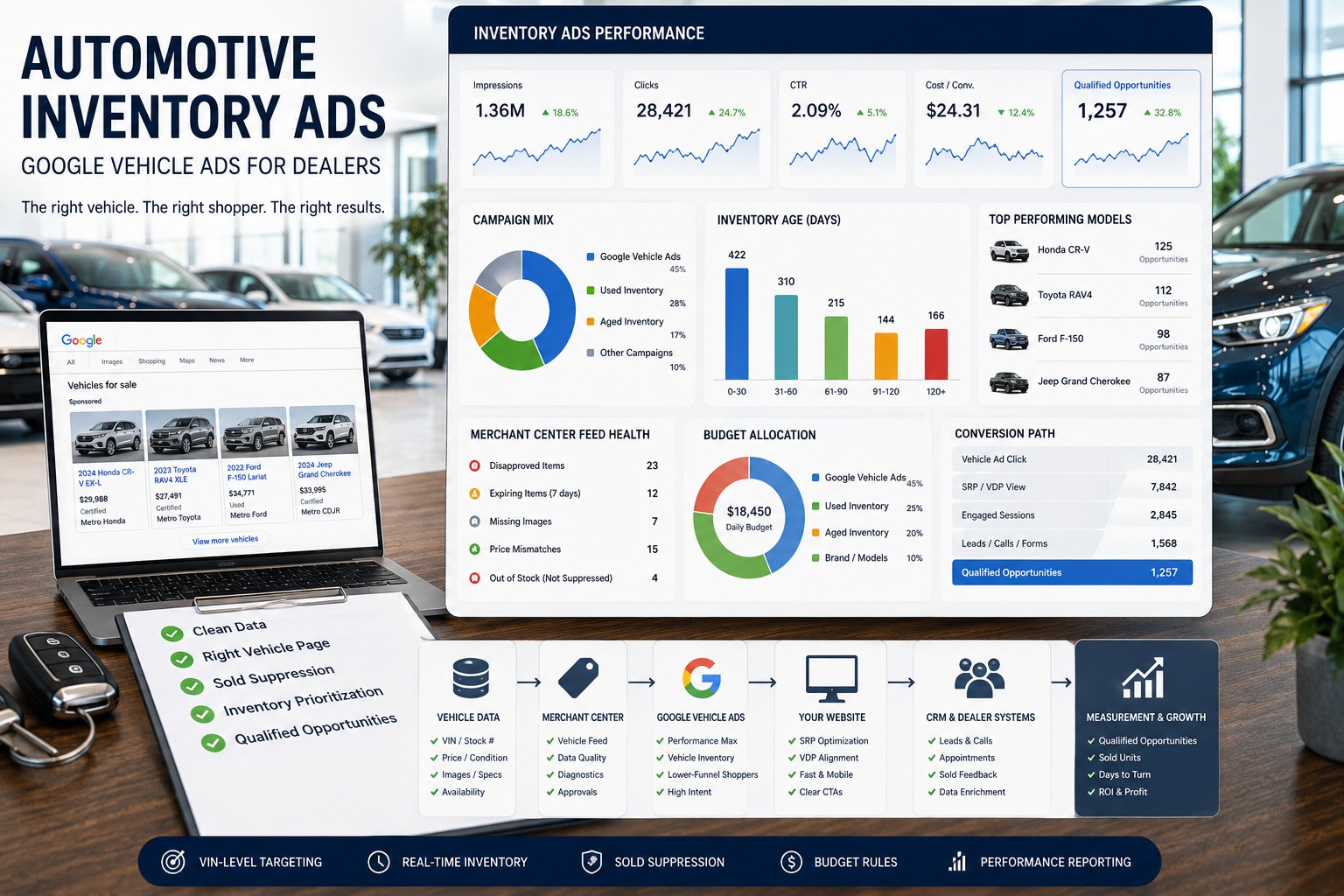
Automotive inventory ads use live dealership vehicle data to place actual new and used inventory in front of shoppers and send each click to a relevant dealership inventory page. In Google’s current Vehicle Ads program, the operating system is Merchant Center vehicle data + Google Ads + accurate dealership VDPs + trustworthy online/offline conversion feedback.
A 2026 dealer operating guide for Google Vehicle Ads, Merchant Center feeds, Performance Max vs Standard Shopping, VDP compliance, aged inventory, sold-unit suppression, measurement and provider accountability.
Quick answer: inventory advertising works when the feed mirrors the lot, each vehicle points to a truthful VDP, sold and unavailable units disappear quickly, campaign structure reflects inventory priorities, and CRM/DMS feedback shows which paid vehicle interactions created qualified opportunities and delivered units.
2026 inventory-ad search demand
Google Ads Keyword Planner data for the United States, English language and Google Search shows active commercial demand around inventory advertising.
| Keyword | Average monthly searches | High top-of-page bid |
|---|---|---|
| automotive inventory ads | 140 | $28.27 |
| vehicle listing ads | 50 | $22.99 |
Choose the right inventory advertising route
| Priority | Best route | Use it when |
|---|---|---|
| Manage the wider paid-media system | Automotive PPC | Campaign, bidding, search-term, budget and offline-conversion governance |
| Build the search account | Google Ads for car dealers | Brand, model, non-brand, local and service search structure |
| Improve organic inventory visibility | Automotive inventory SEO | SRP/VDP discovery and inventory lifecycle handling |
| Fix inventory landing pages | Dealer website platforms | VDP accuracy, speed, filters, forms or platform constraints |
| Connect leads to outcomes | Automotive CRM | Source quality, appointments and delivered-unit feedback |
| Compare providers | Dealer vendor selection | Feed platforms, agencies, adtech or website-vendor services |
| Set spend rules | Dealership marketing budget template | Allocation by rooftop, age, segment and inventory priority |
What Google Vehicle Ads are in 2026
Google describes Vehicle Ads as a performance-focused lower-funnel format for promoting current vehicle inventory. Shoppers can see a vehicle image, make/model, price, mileage and advertiser name, then click directly to the vehicle description page on the dealership website. The format can optimize toward online lead actions and eligible offline goals.
Current Google documentation says Vehicle Ads are available in Australia, Canada, Japan and the United States, with open-beta availability in France, Germany, Italy, Spain, the Netherlands and the United Kingdom. Availability and onboarding rules can change, so verify the target market before implementation.
Google Vehicle Ads activation checklist
Google’s current onboarding path has several dependencies. Treat activation as a controlled implementation with evidence at each step.
| Step | Required action | Evidence gate |
|---|---|---|
| 1. Enable program | Enable Vehicle Ads in the Merchant Center Add-ons area for an eligible market/account | Program shown as enabled |
| 2. Connect Google Ads | Link the Google Ads account that will run Vehicle Ads | Correct Ads account ID visible in Merchant Center linkage |
| 3. Connect locations | Link the applicable Google Business Profile or submit an eligible store data source when GBP management is unavailable | Correct rooftop/store codes mapped to inventory |
| 4. Submit vehicle source | Upload or connect the vehicle data source with required inventory attributes | Vehicles ingested with field-level diagnostics |
| 5. Verify program targeting | Confirm the vehicle data source is eligible for the Vehicle Ads program under current Merchant Center targeting rules | Eligible item count and program status |
| 6. Launch campaign mode | Enable vehicle data in Performance Max or Standard Shopping according to the control model required | Correct feed subset, budget and conversion goals |
| 7. Clear diagnostics | Resolve account and item issues before scaling | Named owner, issue queue and acceptable eligible-inventory coverage |
Performance Max vs Standard Shopping for Vehicle Ads
| Mode | Best fit | Primary strength | Dealer control to verify |
|---|---|---|---|
| Performance Max with vehicle data | Cross-channel automated delivery | AI-powered reach using eligible inventory | Conversion quality, asset settings, brand interpretation, feed segments and offline feedback |
| Standard Shopping with vehicle data | More direct inventory-selection control | Greater control over advertised subsets | Product groups, exclusions, bids/budgets and overlap with PMax |
| Combined deployment | Mature accounts with distinct jobs for both | Separates control jobs across campaign types | Overlap, budget allocation, incremental value and consistent conversion definitions |
Vehicle Ads eligibility and policy gates
| Gate | Current operating requirement to verify |
|---|---|
| Seller | Eligible direct seller under current program rules; private sellers and brokers are excluded. |
| Vehicle | Eligible non-commercial passenger vehicle offered under current program rules. |
| Title | Eligible listed vehicles require a clean title under current policy. |
| Physical location | Dealer needs a qualifying brick-and-mortar location under applicable market rules. |
| Vehicle parts/services | Parts, accessories, tires and service offers are outside Vehicle Ads inventory eligibility. |
| Merchant Center targeting | Vehicle data is configured for the Vehicle Ads program under current targeting rules. |
The feed is campaign infrastructure
A bidder cannot repair a VIN, price, image, availability or location field that arrives wrong. Treat the feed as production infrastructure with an owner, refresh SLA, diagnostics and escalation.
| Feed field/control | What must stay true | Failure impact |
|---|---|---|
| VIN / ID | Unique vehicle identity matches the VDP | Wrong unit, duplicates or disapproval |
| Availability | Source system and VDP reflect sellable status | Spend continues after inventory is gone |
| Price | Feed and landing-page price reconcile | Disapproval or misleading advertising |
| Condition / mileage | Feed values match visible VDP facts | Data-quality issue or shopper mismatch |
| Images | Current compliant vehicle images are available | Disapproval or weak shopper confidence |
| Store code / location | Vehicle maps to the correct rooftop | Wrong-market ads and reporting |
| VDP URL | Direct current canonical vehicle page resolves | Broken or generic landing journey |
2026 Merchant Center data-quality enforcement
From mid-April 2026, Merchant Center account issues began highlighting Vehicle Ads data-quality problems by comparing submitted vehicle data with associated website content. Examples include mismatched availability, condition, price, mileage, VIN, brand and model.
Feed QA therefore needs source-file and rendered-VDP checks. Assign one owner to Merchant Center account issues, define response times by severity and track recurring mismatch root causes back to the DMS, feed vendor, merchandising process or website platform.
VDP policy and landing-page truth
| VDP check | Dealer standard |
|---|---|
| Vehicle identity | VIN, make/model and visible vehicle content match the feed. |
| Availability | Status is clearly visible and updated promptly. |
| Price | Displayed price matches submitted vehicle data under applicable rules. |
| Dealer/location | Dealer identity and location are clear. |
| Mobile usability | Vehicle facts, photos and conversion actions work on mobile. |
| Conversion path | Calls/forms/trade/finance actions preserve unit context. |
| Canonical/status | VDP resolves directly with the intended canonical. |
For U.S. Vehicle Ads, Google’s current price guidance says the submitted price should be the actual price available to any consumer, excluding required government charges and fees. Dealership compliance owners should validate current market requirements.
Sold-unit suppression and feed-failure SLA
| Event | Expected control | Evidence |
|---|---|---|
| Vehicle sold | Source status changes and paid eligibility clears within documented SLA | Timestamped feed and campaign check |
| Price change | Feed and VDP update inside refresh window | Source/feed/VDP comparison |
| Feed outage | Alert reaches named owner with agreed safety response | Incident log and recovery verification |
| VDP failure | Broken destination leaves eligible inventory and website owner is alerted | URL monitoring and resolution record |
| Merchant disapproval | Issue triaged by field/root cause | Account-issue queue and resolution time |
Inventory priority: decide which units deserve incremental spend
| Inventory signal | Possible action | Evidence gate |
|---|---|---|
| New arrival + strong demand | Confirm immediate eligibility and baseline coverage | Feed/VDP ready and demand exists |
| Aged + competitively priced | Apply controlled incremental visibility | Merchandising quality and acceptable unit economics |
| Aged + weak photos/page | Repair merchandising first | VDP passes quality check |
| High-supply model | Segment by model/trim/price position | Stock depth and demand justify dedicated budget |
| Low-margin / low-priority unit | Limit incremental paid exposure | Dealer-defined margin/turn rules |
| Unavailable / feed-uncertain | Suppress | Availability truth restored before re-entry |
SRP vs VDP landing decisions
Exact-unit Vehicle Ads should preserve unit-level intent and normally land on the matching current VDP. Broader inventory demand can use a tightly relevant SRP when the campaign promise represents a set of vehicles.
Cross-platform inventory activation
| Activation | Primary job | Dealer governance |
|---|---|---|
| Google Vehicle Ads | Capture lower-funnel inventory shopping intent | Merchant Center, VDP truth, conversion quality and campaign mode |
| Paid social inventory | Create/recapture demand with vehicle creative | Catalog freshness, audience consent, sold-unit suppression and landing accuracy |
| Dynamic display/video | Retarget or prospect using inventory/market signals | Frequency, audience rules, creative truth and incremental outcome checks |
Inventory-ad measurement from eligibility to sold unit
| Layer | Useful metrics | Business question |
|---|---|---|
| Feed | Eligible units, disapprovals, mismatch rate, suppression SLA | Can the campaign advertise the lot truthfully? |
| Delivery | Impressions, clicks, CPC, coverage by segment | Which inventory receives demand? |
| Landing | VDP engagement, calls/forms/trade/finance actions | Does the shopper continue toward dealer action? |
| CRM | Qualified lead, appointment, show, source quality | Does traffic create useful opportunities? |
| Inventory outcome | Delivered unit, days-to-turn movement, cost per sold unit | Did incremental spend help move priority inventory? |
Vehicle Ads cost and total operating cost
| Cost | Buyer check |
|---|---|
| Media | Dealer controls auction spend in its own ad account. |
| Feed | Setup, mappings, refresh, diagnostics and ownership are explicit. |
| Management | Segmentation, budgets, testing and reporting scope is defined. |
| Website | VDP correction responsibility is named. |
| Measurement | CRM/offline feedback and call tracking are scoped. |
| Exit | Dealer retains accounts, mappings, history and exports. |
Inventory advertising provider scorecard
| Capability | Evidence to require |
|---|---|
| Feed engineering | Field map, refresh SLA, diagnostics and failure workflow |
| Google expertise | Merchant Center + PMax/Shopping Vehicle Ads operating demo |
| Inventory prioritization | Age/model/margin/supply rules the dealer can inspect |
| VDP QA | Price, availability, identity and landing-health checks |
| Sold-unit control | Suppression SLA and incident evidence |
| Measurement | CRM/DMS matchback through delivered-unit outcomes |
| Ownership | Dealer-controlled accounts, feed access, history and transition rights |
| Commercial transparency | Media, platform and service fees separated |
First 90 days of an inventory ads engagement
| Period | Priority | Evidence gate |
|---|---|---|
| Days 1–15 | Audit onboarding links, Merchant Center, source, feed, VDPs, campaigns and CRM | Eligibility baseline, ownership map and mismatch register |
| Days 16–30 | Repair activation gaps, data mismatches, sold-unit handling, destinations and conversions | Clean eligible inventory and documented SLA |
| Days 31–60 | Apply campaign-mode, inventory-priority and budget rules | Controlled coverage/quality tests |
| Days 61–90 | Review qualified opportunities, delivered units, age movement and provider execution | Scale, hold, rebuild or stop by inventory segment |
Inventory advertising red flags
- Program/account/location linkages are unknown.
- Provider cannot explain feed source or refresh cadence.
- Sold vehicles continue receiving spend beyond SLA.
- Merchant Center issues have no named owner.
- Feed and VDP facts disagree.
- All vehicles receive identical budget logic.
- Campaigns land on generic or mismatched pages.
- Reporting ends at clicks or VDP views.
- Dealer lacks durable access to Merchant Center, Google Ads or feed history.
Methodology and sources
The September 2026 revision compares the current top search results with Google’s live Vehicle Ads overview and April 2026 Merchant Center data-quality guidance, plus current dealer-specific implementation guidance.
- Primary sources: Google Vehicle Ads overview and Merchant Center Vehicle Ads data-quality account issues.
- Current-market review: DealerSmart 2026 Google Ads/Vehicle Ads guidance reviewed September 7, 2026.
- Evaluation standard: activation, feed truth, eligibility, VDP parity, inventory economics, sold-unit control, measurement and ownership.
Frequently asked questions about automotive inventory ads
What are automotive inventory ads?
Automotive inventory ads use live vehicle data to promote current dealership inventory and connect shoppers with relevant inventory pages.
What are Google Vehicle Ads?
Google Vehicle Ads are a lower-funnel inventory format that uses Merchant Center vehicle data and Google Ads to show eligible new and used vehicles to shoppers.
What does a dealer need to activate Google Vehicle Ads?
Enable Vehicle Ads in Merchant Center, connect the applicable Google Ads and dealership location data, submit the vehicle data source, confirm program targeting and clear diagnostics before scaling.
Should a dealer use Performance Max or Standard Shopping for Vehicle Ads?
Performance Max provides broader automated cross-channel delivery. Standard Shopping provides more direct inventory-subset control. Both can be used when their roles and overlap are governed.
Can Vehicle Ads promote used cars?
Eligible used vehicles are supported in available markets when seller, feed, vehicle and website requirements are met.
What price should a U.S. dealer submit for Vehicle Ads?
Current U.S. guidance requires the submitted price to reflect the actual consumer-available vehicle price under applicable rules and to reconcile with the landing page.
How often should the vehicle feed refresh?
Set a documented refresh and sold-unit suppression SLA that keeps availability, price, mileage, images and landing pages materially aligned with source inventory.
What must a Vehicle Ads VDP show?
The VDP should present required dealership and vehicle facts such as identity, price, availability and applicable mileage information consistently with the feed.
What changed in Merchant Center Vehicle Ads data quality in 2026?
From mid-April 2026, Google began surfacing Vehicle Ads data-quality issues based on comparisons between submitted feed data and corresponding website content.
How should dealers measure inventory ads?
Measure eligibility and VDP engagement together with qualified leads, appointments, delivered units, cost per sold unit and inventory movement.
Who should own Merchant Center and Google Ads?
The dealership should retain administrative ownership or durable access to accounts, vehicle data sources, conversion actions, history and exports.